Warning: This post is dense with extreme nerdery. Read at your own risk!
I occasionally send my brother quiz questions via text, and as part of a ‘programmers quiz’ I asked him the following last week: “What is the theoretical smallest possible size for a 1024 x 768 jpg image file?” As befits his ‘coding maestro’ status I expected – and received – a quick reply: 1024 bytes. I immediately knew he was guessing, and – sadly – incorrect.
The trouble is I didn’t know the answer. Here right now I’ll attempt to work it out.
Bit of a backstory here: over a decade ago one of the first bits of coding work I did at school was write a piece of software to convert .tiff image files into Excel spreadsheets. It was a bit nifty I believed, especially as the .tiff format was a bit messy and it was my first time running up against the rather hoggish memory requirements of very large Excel files (to which I had to develop a workaround). When I did that I developed a bit of an academic interest in the structure of image files, so my question to B didn’t just come from nowhere.
Starting research into this problem led quickly to the discovery that there are quite a few different types of JPEG file, each with slightly different header structures…
Actually lets go back a bit. Only a portion (admittedly the largest portion) an image file corresponds to the actual image itself. The rest is markers – pieces of information that detail the file type, the file structure and the contents. Think of them like the cover and table of contents of a book, where the actual story (in the book) corresponds to the image data.
In terms of image files, JPEG (for Joint Photographic Experts Group) refers to a technique of compressing data to store information in a smaller size. The mechanics of the compression itself are interesting, and can be thought of as reproducing the data using pre-determined blocks to minimize space. Think of rebuilding a house in lego. It will look basically the same, especially from a distance, but up close you’ll notice all sorts of differences. JPEG compression has the same effect on data. This is problematic for important data (such as executables) but ok for images, which is why JPEG has become the image file standard.
There are a few related versions of JPEG files, which can be grouped into two broad groups: JFIF and EXIF. The difference is in the markers and the exact compression techniques. You could spend ages studying the details, but here I’m just trying to create the smallest file possible so the answer is to go with a JFIF file because they take fewer bytes.
So my question becomes: “What is the theoretical smallest possible size for a 1024 x 768 JPEG/JFIF image file?“
Let’s methodically go over the barest minimum requirements:
– 2 bytes are required for the standard JFIF header (FF D8)
– 18 bytes are required for the mandatory APP0 marker segment. The actual size is 18+3n bytes where n is the dimension of the (square) thumbnail, but since size matters here I’ll skip the thumbnail (ie. n can equal 0).
– 2 bytes are required to mark the start of image data
– N bytes are then dedicated to the image data
– 2 bytes are required to end the image data
Presumably the above is enough. So it seems the answer so far is “24 + N bytes” where N are the bytes required for the compressed image data.
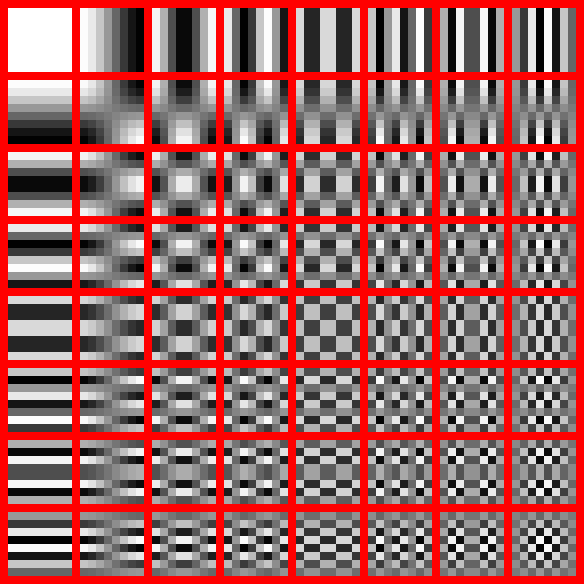
So how to calculate N? Well the compression method itself is deliciously complex, and requires rebuilding the data using only the following 64 8×8 blocks:
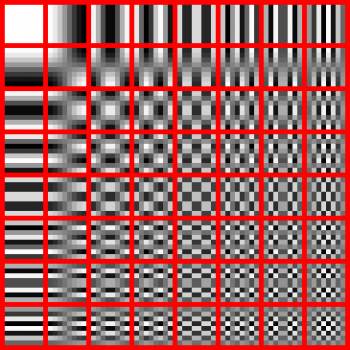
Since the file would be a monochrome (to reduce the required number of blocks) file of dimension 1024 x 768, then it would require (1024/8)x(768/8) or 128 x 96 blocks at maximum compressed. Obviously the block used would be the solid one at top right, but the question is can JPEG compress even further than simply saying (in code): “96 rows of 128 solid blocks in a row”? One would imagine yes.
Putting that aside for a moment, the following 134 byte file is (apparently) the smallest possible JPEG image file (a 1 x 1 image of a single grey pixel; obtained from a few places online):
FF D8 FF E0 00 10 4A 46 49 46 00 01 01 01 00 48 00 48 00 00
FF DB 00 43 00 FF FF FF FF FF FF FF FF FF FF FF FF FF FF FF
FF FF FF FF FF FF FF FF FF FF FF FF FF FF FF FF FF FF FF FF
FF FF FF FF FF FF FF FF FF FF FF FF FF FF FF FF FF FF FF FF
FF FF FF FF FF FF FF FF FF FF C2 00 0B 08 00 01 00 01 01 01
11 00 FF C4 00 14 10 01 00 00 00 00 00 00 00 00 00 00 00 00
00 00 00 00 FF DA 00 08 01 01 00 01 3F 10
Now if a 1024 x 768 file used 12288 (solid) blocks to recreate the image (at one byte each) and then the 24 required marker bytes are added you’ve then got a 12312 byte file. This is about 92 times the above, which isn’t bad for an image 786432 times larger. But more bytes must be required, since according to my quick calculations the 1 x 1 file would only need 25 bytes, but instead uses 134. This is mostly due to the inclusion of the non-mandatory but always apparently used DQT, SOF and DAC markers that index the compression and quantization used. So the extra 109 bytes should probably be included as an approximation to the larger file of the original problem.
This gives a filesize of about 12397 bytes, or about 12.1k.
And yet. And yet this must be wrong. For instance the values 1024 and 768 can be stored in 2 bytes each, the colour (black?) another byte, and the block used another. Couldn’t the data be compressed to only 6 bytes? Obviously not, based on the 1 x 1 file. And obviously not, based on these:


Both of them are solid 1024 x 768 JPEG files. The one on the left is 12.3k (according to Mac OS 10.9.5), the one on the right is 12.9 k. Note that the first example is very close to my estimate.

Thats a solid black JPEG I created myself. It’s 16k according to this computer, which tells me Apple adds a bunch of unnecessary marker information to the file (which is common).
So based on my quick calculations, a few educated guesses, and some examples, I’m going to state that the answer to the question is somewhere between 12 and 13k.
At this point you may be tempted to question the utility of JPEG as a technique to compress simple files like these. Consider the extreme example of a book that contained just the word ‘horse’ 50,000 times. Such a book would run to 200 pages long on average. But you could ‘compress’ it to a single sentence that simply read “Horse fifty-thousand times.” and save a lot of paper. My argument here is that 12288 bytes is an awful lot for something that could be compressed down to only 6 bytes using my method above.
I don’t know the answer except to speculate that JPEG is a compression technique useful for the vast majority of image files. As with all things though, there are exceptions, and if the standard is evaluated solely in terms of it’s ability to reduce the file size, then the gains for degenerate examples (such as these) may not be as great as using another standard (such as GIF).
As a final note, reading about the JPEG format as I have this past week has convinced me of two things:
– The actual mathematics behind the transformations of the data to compress it is fascinating.
– Writing code to actually transform a 1024 x 768 solid block of color and generate the compressed data would be akin to reinventing the wheel 🙂
I hope this answer to an idle question is enough for my brother!